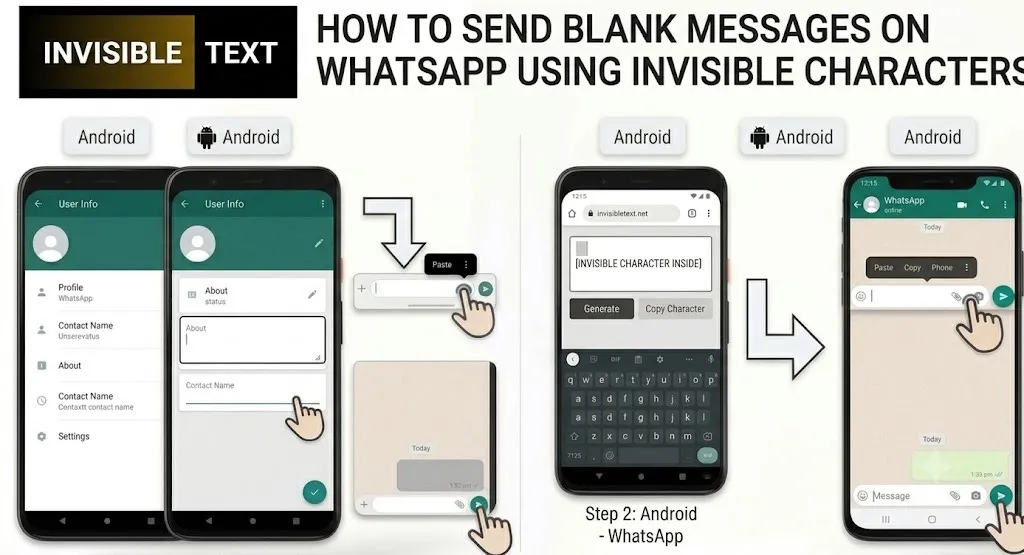
Have you ever wondered how people send a message on WhatsApp that looks completely empty? Since WhatsApp doesn’t allow users to send a message without any content, many people assume it’s impossible. In reality, there’s a simple workaround that uses an invisible Unicode character.
This guide explains how blank WhatsApp messages work, how to send them using invisible characters, why people use them, and what limitations you should know. Everything is explained in simple language so anyone can follow along.
What Is a Blank Message on WhatsApp?
A blank WhatsApp message is a message that appears empty to the recipient. Instead of containing visible letters, numbers, or emojis, it contains a special Unicode character that has no visible appearance.
Although the message looks blank, WhatsApp still recognizes it as containing text, which is why it can be sent successfully.
Important: A blank message is not truly empty. It contains an invisible Unicode character.
What Is an Invisible Character?
An invisible character is a special Unicode character that exists in text but isn’t visible on the screen. It doesn’t display as a letter, symbol, or emoji, but many applications still recognize it as valid text.
Invisible characters are commonly used for:
- Sending blank messages
- Creating empty-looking usernames (where supported)
- Formatting text
- Adding spacing in certain applications
- Testing chat or messaging behavior
Different apps support different invisible characters, so one character may work on WhatsApp while another may not.
Why Doesn’t WhatsApp Allow Empty Messages?
WhatsApp is designed to prevent users from sending messages with absolutely no content. If you leave the message box empty, the Send button won’t work.
This helps prevent accidental empty messages and keeps conversations meaningful.
An invisible character solves this because WhatsApp detects it as text, even though you can’t see it.
Can You Really Send a Blank Message on WhatsApp?
Yes. You cannot send a completely empty message, but you can send a message that looks empty by inserting an invisible Unicode character.
This method works because the message technically contains text, even though it’s invisible.
How to Send a Blank Message on WhatsApp
There are two easy ways to do it.
Method 1: Copy and Paste an Invisible Character
This is the easiest method.
Step 1: Copy an Invisible Character
Copy a supported invisible Unicode character from a trusted source or an invisible character tool.
Step 2: Open WhatsApp
Launch WhatsApp on your phone or computer.
Step 3: Open the Chat
Select the person or group where you want to send the blank message.
Step 4: Paste the Character
Paste the invisible character into the message box.
Step 5: Tap Send
Your message will appear blank to the recipient.
Method 2: Use an Invisible Character Generator
Many websites provide tools that generate invisible Unicode characters with one click.
The process is simple:
- Open the tool.
- Click Copy Invisible Character.
- Open WhatsApp.
- Paste the character.
- Send the message.
This is the quickest option because you don’t need to manually search for Unicode characters.
Does This Work on Every Version of WhatsApp?
In most cases, yes.
Blank messages usually work on:
- WhatsApp for Android
- WhatsApp for iPhone
- WhatsApp Web
- WhatsApp Desktop for Windows
- WhatsApp Desktop for Mac
However, the appearance can vary depending on:
- Your WhatsApp version
- Your operating system
- The Unicode character being used
If one invisible character doesn’t work, another supported Unicode character may.
Why Do People Send Blank Messages?
People use blank messages for many harmless reasons.
Just for Fun
Many users send blank messages to surprise friends or create funny conversations.
Playing Chat Games
Some games involve guessing who sent the blank message or responding without knowing what happened.
Testing WhatsApp Features
Developers, testers, and curious users sometimes use invisible characters to test notifications, message behavior, or formatting.
Creating Visual Spacing
In certain situations, invisible characters help create spacing between messages or sections of text.
Experimenting With Unicode Characters
Some users simply enjoy learning how Unicode works across different applications.
Are Blank Messages Safe?
Yes.Invisible Unicode characters are part of the Unicode standard and do not contain malware, viruses, or hidden programs.
They’re simply text characters that aren’t visible.
To stay safe:
- Use trusted invisible character tools.
- Avoid downloading unknown apps just to generate invisible text.
- Don’t copy text from suspicious websites.
Will WhatsApp Ban Your Account?
Generally, no. Using invisible characters occasionally for fun is not known to violate WhatsApp’s messaging functionality.
However, repeatedly sending blank messages to strangers, groups, or contacts in a way that annoys or harasses others may lead to reports against your account.
As with any messaging feature, use it responsibly.
Things to Know Before Sending Blank Messages
Before using invisible characters, keep these points in mind:
- Not every invisible Unicode character works on WhatsApp.
- Future WhatsApp updates could change how certain characters behave.
- Some messaging apps automatically remove invisible characters.
- Different devices may display blank messages differently.
- Sending too many blank messages may confuse recipients.
Best Practices for Using Invisible Characters
To use blank messages responsibly:
- Send them occasionally for fun.
- Don’t spam contacts or groups.
- Respect other people’s conversations.
- Avoid using blank messages to mislead or confuse others.
- Test different invisible characters if one doesn’t work.
Frequently Asked Questions (FAQs)
Can I send a completely empty message on WhatsApp?
No. WhatsApp blocks completely empty messages. You need an invisible Unicode character for the message to be sent.
Do blank messages work on Android and iPhone?
Yes. Supported invisible characters generally work on both Android and iPhone versions of WhatsApp.
Can I use invisible characters on WhatsApp Web?
Yes. Most supported invisible Unicode characters also work on WhatsApp Web and desktop versions.
Are invisible characters free to use?
Yes. Unicode characters are freely available and don’t require payment.
Can someone tell that I used an invisible character?
Most people will simply see what appears to be an empty message. They usually won’t notice that an invisible Unicode character was used.
Why isn’t my blank message sent?
Possible reasons include:
- The copied character isn’t supported by WhatsApp.
- The character was removed while copying.
- Your WhatsApp version behaves differently.
- The website provided an unsupported invisible character.
Try copying another supported invisible character.
Final Thoughts
Although WhatsApp doesn’t allow users to send completely empty messages, invisible Unicode characters make it possible to send messages that appear blank. It’s a simple trick that many people use for fun, testing, or experimenting with text formatting.
As long as you use blank messages responsibly and avoid spamming others, invisible characters are a harmless way to explore one of Unicode’s interesting features.