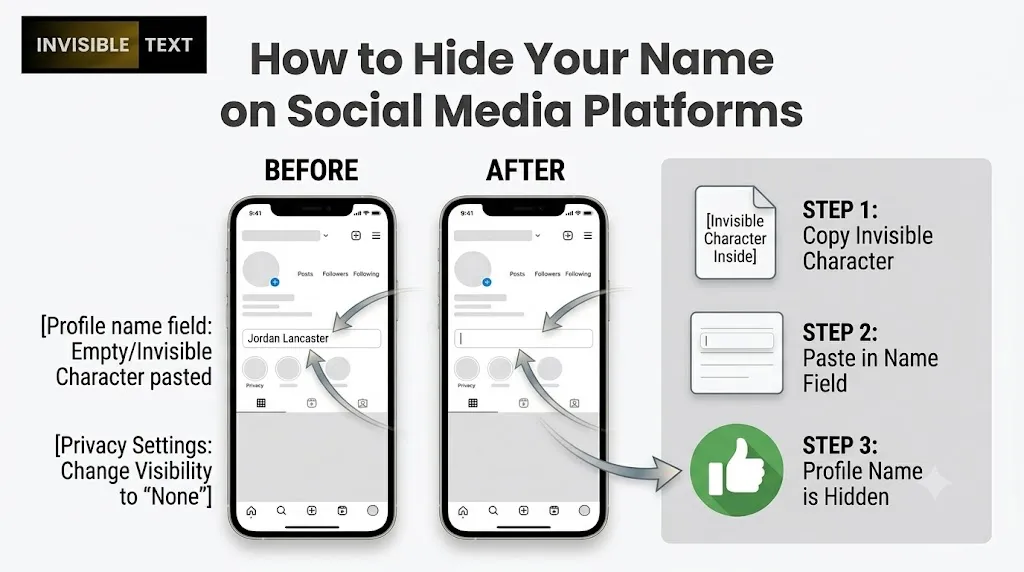
Social media is used by billions of people every day to connect with friends, share updates, and express themselves online. While many users prefer showing their real names, others choose a different approach by using hidden or invisible profile names. A blank display name can make a profile look unique, add an extra layer of privacy, or simply create a more minimal appearance.
However, most social media platforms do not allow users to leave the name field empty, which makes creating an invisible name difficult using normal spaces alone. This is where invisible characters become useful. These special Unicode characters look empty to the human eye but are still recognized as valid text by many platforms.
In this guide, you’ll learn how hidden names work, how to create one, and which social media platforms may support them.
A hidden name is a profile name that appears blank or invisible to other users. Although it looks empty, the name actually contains one or more invisible Unicode characters that social media platforms recognize as valid text.
This allows users to create a figure space that cannot be seen by others while still meeting the platform’s requirements.
Why Do People Hide Their Names?
Hidden names have become increasingly popular for several reasons.
Better Privacy
Some users prefer not to display their real names publicly, especially on public profiles.
A Unique Profile Style
An invisible name instantly makes a profile stand out from thousands of others.
A Clean and Minimal Look
Many users like the simple appearance of a profile without visible text.
To Spark Curiosity
Blank names often catch attention and encourage people to visit the profile.
Can You Hide Your Name Using Regular Spaces?
No. Most social media platforms automatically remove extra spaces or reject names that contain only spaces. For example, if you press the spacebar several times and try to save your profile, you’ll usually receive an error message. This happens because platforms treat regular spaces as empty input rather than actual text.
What Makes Invisible Characters Different?
Invisible characters are special Unicode characters that do not display any visible symbol on the screen. Unlike regular spaces, many platforms treat these characters as real text input.
As a result, they can sometimes be used to create invisible names where normal spaces fail. Think of them as hidden characters that exist in the background even though users cannot see them.
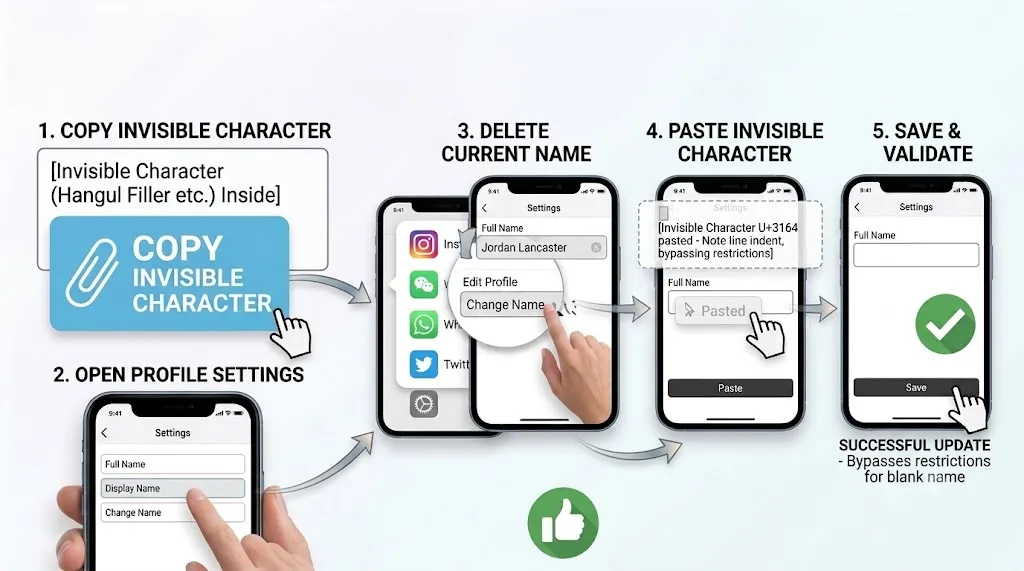
Copy an Invisible Character
Start by copying an invisible character from an invisible text generator or invisible character tool.
Open Your Profile Settings
Open the social media app where you want to hide your name and navigate to your profile settings.
Look for options such as:
- Edit Profile
- Change Name
- Display Name
- Username Settings
Remove Your Existing Name
Delete your current display name from the name field. Make sure there are no visible characters left behind.
Paste the Invisible Character
Paste the copied invisible character into the name field.
Although the field may appear empty, the invisible character is still there.
Save Your Changes
Press the Save button and check whether the platform accepts the invisible name. If the update is successful, your profile name will appear blank to other users.
Support varies from platform to platform. Some services may allow invisible text names, while others block them completely.
Platforms that sometimes support invisible display names include:
- Instagram
- Snapchat
- Discord
- TikTok
- Telegram
- Some gaming platforms
Keep in mind that support can change after updates.
Many social media companies restrict invisible names to prevent:
- Spam accounts
- Fake profiles
- Impersonation
- Misleading usernames
Because of this, a method that works today may stop working after a future update.
Do Invisible Names Work Forever?
Not always. Social media platforms frequently update their systems and naming rules. An invisible name that works on one platform today may stop working tomorrow. For this reason, invisible names should be viewed as a feature that depends entirely on platform support.